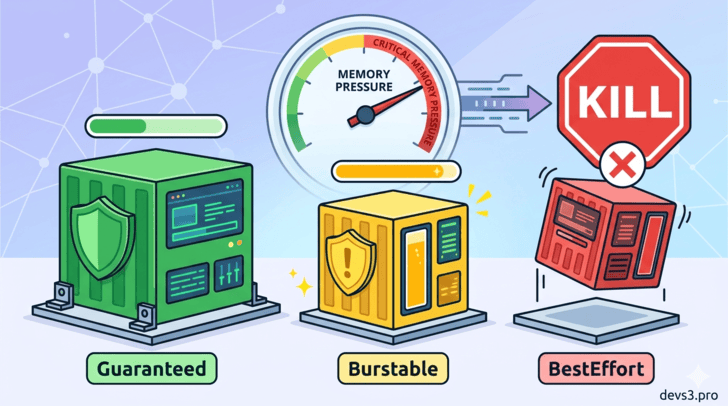
1. Introduction: The Silent Node Killer
Kubernetes is a master at packing workloads onto nodes, but what happens when a node runs out of memory? Pods start crashing, applications become slow, and if you're unlucky, your most critical service might be the one that gets killed.
Not all pods suffer equally. Kubernetes uses Quality of Service (QoS) Classes to decide which pods are protected and which are sacrificed first when memory pressure hits.
In this article, we’ll go step by step through:
What QoS classes are and how they are assigned
Which pods die first (and last)
How eviction actually works under the hood
Practical SRE advice to keep your apps alive
2. What Are QoS Classes?
When the kubelet (the node agent) detects low memory, it must evict some pods to free up resources. QoS classes are Kubernetes’ way of ranking pods by importance.
There are exactly three QoS classes:
Class			Priority				Memory Request		Memory Limit
Guaranteed		Highest (last to die)	Set					Set (equal to request)
Burstable		Medium					Set					Set (higher than request) or not set
BestEffort		Lowest (first to die)	Not set				Not set
💡 Key insight: The class is automatically assigned by Kubernetes based on the pod’s resource requests/limits. You never write
qosClass: Guaranteedin YAML.
3. Detailed Breakdown of Each QoS Class
✅ Guaranteed – The Protected Class
How to get it:
Every container in the pod must have both
requestsandlimitsset for memory and CPU.The
requestandlimitmust be equal for each resource.
Example:
resources:
  requests:
    memory: "512Mi"
    cpu: "500m"
  limits:
    memory: "512Mi"
    cpu: "500m"
Behavior:
Kubernetes considers these pods “critical” – they are almost never evicted due to memory pressure.