
Cron is one of the most powerful scheduling tools available on Linux and Unix systems. Most developers know how to schedule a task every minute, every hour, or every day. However, many people struggle when they need to execute a script only on a specific date and during a specific time window.
This article explains how to achieve that cleanly and reliably.
Understanding Cron
A cron expression consists of five fields:
* * * * * command
│ │ │ │ │
│ │ │ │ └── Day of Week (0-7)
│ │ │ └──── Month
│ │ └────── Day of Month
│ └──────── Hour
└────────── Minute
For example:
*/5 * * * * /path/to/script.sh
This executes the script every 5 minutes, every hour, every day.
But what if you want something more specific?
Scenario 1
Run Every 5 Minutes Only on a Specific Date and Hour
Suppose you want to execute a script:
- Date: 20 July 2026
- Time: 2:00 PM – 2:59 PM
- Frequency: Every 5 minutes
A simple cron entry can do this:
*/5 14 20 7 * [ "$(date +\%Y-\%m-\%d)" = "2026-07-20" ] && /path/to/script.sh
How It Works
*/5→ Every 5 minutes14→ Hour 14 (2 PM)20→ 20th day7→ July
date +%Y-%m-%d ensures the year is 2026
Without the year check, the cron would execute every year on July 20.
Scenario 2
Run Every 5 Minutes Between Two Times
Imagine you want:
- Date: 20 July 2026
- Start: 2:15 PM
- End: 3:45 PM
Every 5 minutes
Use:
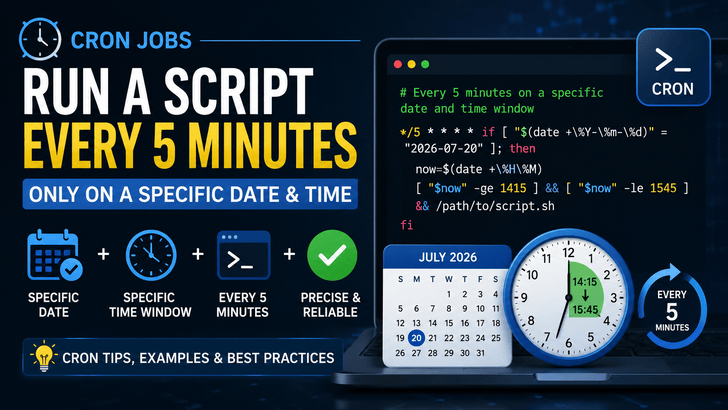
*/5 * * * * if [ "$(date +\%Y-\%m-\%d)" = "2026-07-20" ]; then
    now=$(date +\%H\%M)
    [ "$now" -ge 1415 ] && [ "$now" -le 1545 ] && /path/to/script.sh
fi
What Happens?
Cron wakes up every 5 minutes.
The script only executes if:
- Today's date is 2026-07-20
- Current time is between 14:15 and 15:45
Scenario 3
Execute Once at an Exact Time
Need to run a script only once?
Example:
- 20 July
- 2:30 PM
30 14 20 7 * /path/to/script.sh
This runs every year on July 20 at 2:30 PM.
Run Only Once in a Specific Year
Cron does not support a year field.
Many developers don't realize this.
If you need a task to execute only once in 2026, use the at command:
echo "/path/to/script.sh" | at 2:30 PM Jul 20 2026
The job is executed once and automatically removed from the queue.
Why Cron Doesn't Support Years
Cron was intentionally designed for recurring schedules.
Its philosophy is:
- every minute
- every hour
- every day
- every week
- every month
A specific year isn't part of the original cron specification.
If you require year-aware scheduling, you generally have three options:
- Check the year inside your command.
- Use the
atscheduler. - Use a more advanced scheduler such as systemd timers, Jenkins, Kubernetes CronJobs, Airflow, or cloud schedulers.
Best Practices
Always Use Absolute Paths
Bad:
python script.py
Good:
/usr/bin/python3 /home/user/scripts/script.py
Redirect Logs
*/5 * * * * /path/to/script.sh >> /var/log/script.log 2>&1
This makes debugging much easier.
Use Full Environment Variables
Cron runs with a minimal environment.
Instead of:
python
Use:
/usr/bin/python3
Similarly:
/usr/bin/bash
/usr/bin/php
/usr/bin/node
Test Before Scheduling
Run your script manually first:
bash /path/to/script.sh
If it fails manually, cron won't magically fix it.
Common Mistakes
❌ Forgetting to escape %
Inside cron:
date +%Y
Should become:
date +\%Y
Otherwise % is interpreted as a newline by cron.
❌ Using relative paths
./backup.sh
Instead:
/home/server/scripts/backup.sh
❌ Assuming cron knows your shell profile
Cron does not automatically load:
.bashrc
.profile
.zshrc
If required, source them manually inside your script.
Real-World Use Cases
This scheduling technique is particularly useful for:
- Planned maintenance windows
- Database migration jobs
- Temporary monitoring scripts
- Router firmware upgrades
- One-day log collection
- Limited-time promotional campaigns
- Cloud resource scaling during special events
- Security audits
- Disaster recovery drills
Final Thoughts
Cron is incredibly powerful, but many advanced scheduling requirements can be solved with a simple combination of cron expressions and shell conditions.
When you need "every 5 minutes, but only on a specific date and within a specific time range," there's no need for complex automation platforms. A few extra lines of shell logic can make your cron jobs precise, predictable, and production-ready.
Understanding these techniques can save time, reduce operational mistakes, and make your automation workflows significantly more reliable.