
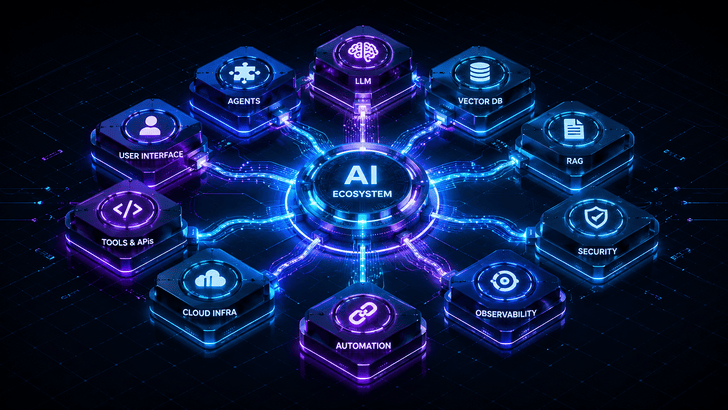
The landscape of artificial intelligence has exploded. A few years ago, “building with AI” meant training a model from scratch or calling a single API. Today, it means orchestrating dozens of specialized components into reliable, intelligent systems that can reason, remember, retrieve, act, and communicate with the outside world.
For anyone stepping into AI engineering, the sheer number of tools can be overwhelming. But here’s the secret: the tools aren’t the point. What separates an AI user from an AI engineer is understanding how these building blocks form a cohesive ecosystem—a stack where each layer solves a distinct problem and passes its output cleanly to the next.
Below, I’ll walk you through the 11 essential categories of that ecosystem, exactly as every builder should see them. By the end, you won’t just have a list of names; you’ll have a blueprint for thinking about AI systems holistically.
1. LLM Tools – The Reasoning Core
Every modern AI stack starts with a large language model. These models generate text, code, and reasoning, serving as the brain of your application. The choice here isn’t just about performance—it’s about latency, cost, privacy, and fine-tuning ability.
Key players:
- OpenAI (GPT-4o, o1) – The general-purpose standard.
- Anthropic Claude – Excels at safe, long-context reasoning.
- Google Gemini – Multimodal and deeply integrated with Google Cloud.
- Meta Llama – Open-weight, allowing self-hosting and customization.
- Mistral – Efficient open models with strong multilingual performance.
- Cohere – Optimized for enterprise RAG and embedding use cases.
Engineer’s mindset: Don’t just pick the most powerful model. Ask what your system actually needs. A simple classification task might only need Llama 3 8B running locally, while complex multi-step agent orchestration might demand the reasoning depth of Claude or GPT-4o. The LLM isn’t a black box—it’s a component you choose and tune like any other.
2. Embedding Tools – The Semantic Bridge
LLMs understand words; embeddings let machines understand meaning. Embedding models convert text into high-dimensional vectors where semantically similar content sits close together. Without embeddings, there’s no semantic search, no clustering, no retrieval.
Where they fit: Before you can search over documents or power a recommendation system, you need to turn raw text into vectors.
Key tools:
- OpenAI Embeddings (text-embedding-3-small/large) – Easy, reliable, but proprietary.
- Voyage AI – State-of-the-art embeddings optimized for retrieval and code.
- BGE (BAAI General Embedding) – Leading open-source option for many benchmarks.
- Sentence Transformers – The workhorse library for fine-tuning and running embedding models locally.
Engineer’s insight: The same embedding model must be used consistently from indexing through query time. Changing models later means re-indexing everything. That’s a design decision you make on day one.
3. Vector Databases – The Long-Term Memory for Data
Embeddings need to live somewhere. Vector databases store these vectors and perform lightning-fast similarity searches, enabling you to find the most relevant chunks of information in milliseconds.
Core options:
- Pinecone – Fully managed, serverless, zero-ops.
- Weaviate – Graph-like, hybrid search out of the box.
- Qdrant – High-performance, Rust-based, excellent filtering.
- Milvus – Purpose-built for massive scale, cloud-native.
- Chroma – Lightweight, developer-friendly, great for prototyping.
- pgvector – Turns PostgreSQL into a vector store, perfect for teams wanting a single database.
How it connects: Your RAG system will call this database to retrieve context. Agents will query it to fetch relevant past interactions. Observability platforms will log traces here. Understanding the cost/performance trade-offs of each vector store is fundamental to building anything that scales.
4. RAG Tools – Giving LLMs Access to Your Data
Retrieval-Augmented Generation (RAG) is how you ground an LLM in your own data—company docs, knowledge bases, code repositories—without fine-tuning. RAG frameworks abstract the messy pipeline of loading, chunking, embedding, retrieving, and synthesizing.
Frameworks to know:
- LangChain – The original, vast ecosystem for chaining LLM calls with retrieval.
- LlamaIndex – Data-centric framework built specifically around RAG and data agents.
- Haystack – Modular pipeline builder by deepset, strong in production NLP.
- GraphRAG – Microsoft’s approach that combines knowledge graphs with RAG for global comprehension.
- RAGFlow – Open-source, visual, focused on deep document understanding.
Why this matters: A naive RAG implementation fails often. The engineering lies in chunking strategies, hybrid search (sparse + dense), re-ranking, and choosing the right prompt template. These frameworks give you the lego blocks, but you decide how to assemble them.
5. Agentic AI – Autonomous Workflows
When one LLM call isn’t enough, you build agents. Agentic AI frameworks let the model reason, plan, use tools, and iterate autonomously. The system breaks down a task, decides which tool to call, observes the result, and decides the next step—sometimes in a loop.
Leading frameworks:
- LangGraph – Builds stateful, cyclical agent workflows using a graph-based approach.
- CrewAI – Role-based agents that collaborate like a team.
- AutoGen – Microsoft’s multi-agent conversation framework.
- LlamaIndex Workflows – Event-driven agent orchestration.
- Agno – Lightweight, high-performance agent framework (emerging).
The engineer’s role: Here, you’re designing control flow, managing hallucinations in a loop, setting stop conditions, and ensuring that an agent doesn’t burn through your token budget repeating the same failed action. Agentic AI is where the stack starts to become a true system, not just a single query.
6. AI Agent Tools – Production-Ready Agents
Distinct from experimental agent frameworks, these SDKs are built by major vendors to create reliable, deployable agents that follow strict protocols. They’re opinionated, stable, and integrate deeply with their respective ecosystems.
What to master:
- OpenAI Agents SDK – New unified SDK for building agents with handoffs, guardrails, and tracing.
- LangChain Agents – The LangChain expression language and tool-calling abstractions.
- PydanticAI – Type-safe, structured agent loops built on Pydantic.
- Semantic Kernel – Microsoft’s orchestration SDK, strong in enterprise .NET/Azure stacks.
- Google ADK – Agent Development Kit for Gemini-powered agents.
Mindset shift: Using these is about engineering reliability. You’re thinking about structured outputs, error handling, retries, and deterministic logging—the things that turn a cool demo into a production service.
7. Memory Tools – Persistent State Across Sessions
Stateless LLM calls are limited. Memory tools give AI agents and applications long-term and short-term memory, allowing them to recall user preferences, past conversations, and learned facts across sessions.
Key solutions:
- Mem0 – Memory layer that extracts, stores, and updates user memories automatically.
- Zep – Persistent memory for enterprise AI assistants with recall and search.
- Letta (formerly MemGPT) – Virtual context management that lets models handle their own memory.
- LangGraph Memory – Built-in persistent storage for graph-based agent state.
- Redis – Often used as a fast short-term cache for conversational context.
How it fits: The memory layer sits between the agent and the vector database, often using embeddings to decide what is relevant right now. It’s what makes a chatbot feel like it actually knows you over weeks and months, not seconds.
8. MCP Tools – The Universal Connector
The Model Context Protocol (MCP), pioneered by Anthropic, is becoming the open standard for connecting AI models to external tools, data sources, and services. Instead of writing custom API wrappers for every integration, MCP provides a universal, secure interface.
Essential MCP components:
- FastMCP – The quickest way to build and serve your own MCP servers.
- MCP Registry – Centralized discovery of existing MCP servers.
- GitHub MCP Server – Allows AI to read/write repositories, issues, and PRs.
- Slack MCP Server – Connects AI agents directly to your workspaces.
Why engineers should care: MCP turns your AI application from a closed box into a platform. Need your agent to send an email, check a calendar, or query a database? There’s likely an MCP server for that. Understanding how to write and host your own MCP servers means you can integrate anything.
9. Automation Tools – The Orchestration Layer
Not everything should happen in real-time. Automation tools orchestrate AI workflows end-to-end, handling scheduling, retries, and integration with hundreds of non-AI services. They’re the glue that connects your AI stack to the rest of your business.
Top choices:
- n8n – Open-source, visual workflow automation, increasingly AI-native.
- Zapier – The no-code giant with a massive app ecosystem.
- Make – Powerful visual scenarios for complex logic.
- Airflow – The standard for batch data pipeline orchestration.
- Prefect – Modern, Python-native workflow management.
- Kestra – Declarative, event-driven orchestration for data and ML.
Engineering perspective: If your AI agent needs to run a nightly summarization of support tickets and post to a dashboard, this is the layer that handles it. Choose a tool that matches your team’s skills: low-code (Zapier, Make) for rapid prototyping, code-first (Prefect, Airflow) for complex pipelines.
10. Observability Tools – The Debugging Eyes
When an AI system behaves unexpectedly, you need to see inside. Observability tools let you trace every LLM call, see token usage, inspect retrieval steps, and evaluate output quality. This is non-negotiable for production.
Must-know tools:
- LangSmith – Full-lifecycle LLM observability from LangChain, with evaluation suites.
- Langfuse – Open-source tracing, prompt management, and evaluation.
- Weights & Biases Weave – Tracks experiments, data lineage, and LLM traces.
- Helicone – Lightweight, developer-focused analytics for LLM costs and performance.
What you’ll do with them: Monitor latency, catch hallucination spikes, see which tools an agent used, and compare prompts across versions. Observability is the feedback loop that makes you a better engineer. Without it, you’re blind.
11. AI Security Tools – Guarding the Gates
Last, and increasingly critical, is security. AI systems face prompt injection, jailbreaks, data leakage, and toxic output. Security guardrails sit between the user and the model—and between the model and your tools—enforcing safety policies.
Leading solutions:
- NVIDIA NeMo Guardrails – Programmable guardrails for dialog safety and topic control.
- Lakera Guard – Real-time protection against prompt injection and data loss.
- Guardrails AI – Structured validation of LLM outputs using your own specs.
- Azure AI Content Safety – Managed service for detecting harmful content.
Security isn’t optional. If your agent can send emails or query a database, a single prompt injection could be catastrophic. Integrate guardrails early, not as an afterthought. Understand the threats, because the attacker only needs to succeed once.
The Big Picture: How It All Fits Together
Imagine you’re building an AI customer support engineer:
- A user question comes in. Security guardrails scan the input for prompt injection.
- The request flows to an agent built with Agentic AI (LangGraph).
- The agent queries a vector database (Qdrant) using embeddings (Voyage AI) to find relevant docs via a RAG pipeline (LlamaIndex).
- It checks memory (Mem0) for any previous context about the user.
- It decides to create a support ticket; an MCP server for Jira is invoked securely.
- The final answer is generated by the LLM (Claude), monitored by observability (Langfuse), and logged.
- The whole flow, along with scheduled nightly reports, is orchestrated by an automation tool (Prefect).
That’s not a list of tools—it’s a system. Every piece is necessary, and the interfaces between them are where the real engineering happens.
From User to Engineer
Mastering individual tools is useful. You can be extremely fast with Pinecone or an expert at writing LangChain chains. But understanding how they work together is what separates AI users from AI engineers.
An AI user says, “I’ll use ChatGPT for this.”
An AI engineer asks:
- Which model is appropriate for the cost/latency budget?
- How do I retrieve the right context from my knowledge base?
- What embeddings and chunk size will give the best recall?
- Does the agent need long-term memory, and how do I manage it?
- How do I connect it to external APIs securely?
- Where are the traces going, and how will I detect failures?
You don’t need to use every tool in every project. But you must know the role each category plays so that when you need it, you know exactly what to reach for.
Start with a problem, map it onto this ecosystem, and choose the simplest set of components that can solve it. Over time, you’ll develop an intuition for the stack—and that’s when you stop being someone who merely uses AI, and start being someone who builds with it.