
Microsoft Windows is still the most widely used desktop operating system in the world. But with Windows 11 now established and Windows 10 slowly approaching end-of-support, many users are asking one important question:
Should I upgrade to Windows 11, or stay on Windows 10?
In this article, we’ll break down real-world differences, performance, features, compatibility, and help you decide which Windows version is best for you in 2025.
🔹 What Is Windows 10?
Windows 10 was released in 2015 and quickly became one of Microsoft’s most successful operating systems. It focused on:
- Stability
- Compatibility
- Familiar desktop experience
Even today, millions of PCs still run Windows 10 because of its reliability and low hardware requirements.
✅ Key Features of Windows 10
- Classic Start Menu with Live Tiles
- Excellent support for older hardware
- Strong compatibility with legacy software
- Lightweight compared to Windows 11
🔹 What Is Windows 11?
Windows 11, released in 2021, represents Microsoft’s vision of a modern, secure, and AI-ready OS. It introduces a refreshed design and tighter hardware requirements.
✨ Key Features of Windows 11
- Centered Start Menu & Taskbar
- New Snap Layouts for multitasking
- Improved gaming performance (DirectStorage, Auto HDR)
- Better touch & tablet support
- Stronger security with TPM 2.0
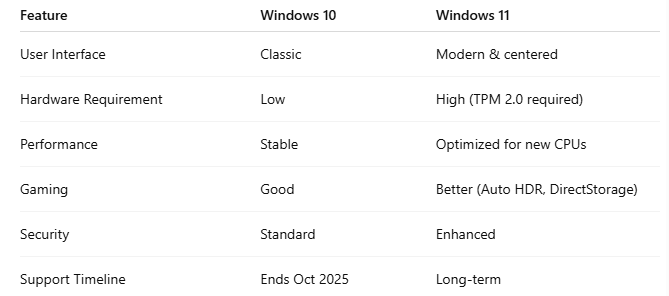
🆚 Windows 11 vs Windows 10: Core Differences
⚙️ Performance Comparison (Real World)
- Older PCs (pre-2018) → Windows 10 runs smoother
- New PCs (Intel 12th gen+, Ryzen 5000+) → Windows 11 performs better
- Boot times and memory handling are slightly improved in Windows 11
👉 If your device officially supports Windows 11, you’ll notice better efficiency and responsiveness.
🔐 Security: A Major Difference
Windows 11 focuses heavily on security:
- TPM 2.0
- Secure Boot
- Virtualization-Based Security (VBS)
This makes Windows 11 a better choice for work, business, and sensitive data.
🎮 Gaming: Which Is Better?
Windows 11 is the clear winner for gamers:
- Auto HDR improves visuals
- DirectStorage reduces game loading times
- Better future support for next-gen games
However, casual gamers won’t notice a huge difference yet.
👨💻 Who Should Use Windows 10?
Choose Windows 10 if:
- Your PC doesn’t support TPM 2.0
- You use older software or hardware
- You want maximum stability
- You dislike UI changes
🚀 Who Should Use Windows 11?
Choose Windows 11 if:
- You have a modern PC or laptop
- You care about security
- You multitask a lot
- You want future updates and features
🧠 Final Verdict
Windows 11 is the future, but Windows 10 is still reliable.
✔ Upgrade to Windows 11 if your PC supports it
✔ Stay on Windows 10 if your hardware is older
✔ Avoid forced upgrades on unsupported devices
💡 Remember: Windows 10 support ends in October 2025, so planning ahead is smart.
❓ Frequently Asked Questions (FAQ)
Is Windows 11 free?
Yes, it’s free for eligible Windows 10 users.
Is Windows 11 slower?
No, it’s faster on supported hardware.
Can I downgrade from Windows 11?
Yes, within 10 days of upgrade.
Should I upgrade now?
If your PC supports it — yes.