

Android is the most popular mobile operating system in the world, powering billions of smartphones, tablets, TVs, and even cars. But not all Android devices feel the same — some are clean and fast, while others are heavily customized.
So what exactly is Android OS, and what’s the difference between Stock Android and Custom ROMs?
In this article, we’ll explain Android from the ground up — simple, practical, and beginner-friendly.
🔹 What Is Android OS?
Android is an open-source mobile operating system developed by Google, based on the Linux kernel. It was first released in 2008 and has since evolved into a powerful, flexible platform.
Android powers:
- Smartphones & tablets
- Smart TVs (Android TV)
- Smartwatches (Wear OS)
- Cars (Android Auto)
- IoT devices
Because Android is open-source, manufacturers and developers can customize it freely — which is both its biggest strength and biggest weakness.
🔧 Android OS Architecture (Simple Explanation)
Android is built in layers:
- Linux Kernel – Hardware control (CPU, memory, drivers)
- Hardware Abstraction Layer (HAL) – Talks to device hardware
- Android Runtime (ART) – Runs Android apps
- Native Libraries – Graphics, media, database
- Application Framework – APIs for developers
- Applications – Apps you use daily
This layered design makes Android powerful and customizable.
🌱 What Is Stock Android?
Stock Android is the clean, pure version of Android provided by Google — without heavy customizations.
Devices using Stock Android:
- Google Pixel
- Android One phones
- Some Motorola & Nokia devices
✅ Advantages of Stock Android
- Fast and smooth performance
- No unnecessary pre-installed apps
- Faster Android updates
- Better battery optimization
❌ Disadvantages
- Fewer extra features
- Limited customization compared to OEM skins
👉 Best for users who prefer simplicity and speed.
🎨 What Is Custom Android (OEM Skins)?
Most brands modify Android to create their own user experience.
Popular Android skins:
- Samsung One UI
- Xiaomi MIUI / HyperOS
- Oppo ColorOS
- Vivo Funtouch OS
- Realme UI
✅ Advantages
- Extra features
- Visual customization
- Brand-specific tools
❌ Disadvantages
- Slower updates
- Pre-installed bloatware
- Performance varies by brand
👉 Best for users who want features and customization.
🔓 What Is a Custom ROM?
A Custom ROM is a modified version of Android created by independent developers or communities, replacing the manufacturer’s OS.
Popular Custom ROMs:
- LineageOS
- Pixel Experience
- crDroid
- Evolution X
🧪 Why Do People Use Custom ROMs?
- Remove bloatware
- Extend phone life after updates stop
- Improve performance
- Get latest Android version
- Enhance privacy
⚠️ Risks of Custom ROMs
- Voids warranty
- Possible bugs
- Requires technical knowledge
- Banking apps may not work
👉 Best for advanced users and developers.
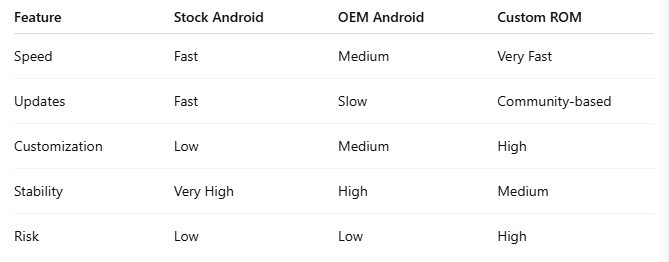
📊 Stock Android vs Custom ROM vs OEM Android
🔐 Android Security & Privacy
Android has improved security significantly:
- Google Play Protect
- App sandboxing
- Permission control
- Monthly security patches
However:
- Security depends on manufacturer updates
- Custom ROMs vary in security quality
📱 Who Should Use Which Android?
Choose Stock Android if:
- You want speed and simplicity
- You like fast updates
- You dislike bloatware
Choose OEM Android if:
- You like extra features
- You want brand-specific tools
- You prefer custom UI
Choose Custom ROM if:
- You’re a power user
- Your phone no longer gets updates
- You want full control
🧠 Final Verdict
Android’s flexibility is unmatched.
✔ Beginners → Stock or OEM Android
✔ Feature lovers → OEM Android
✔ Developers & enthusiasts → Custom ROM
💡 Android is not one OS — it’s an ecosystem.
❓ Frequently Asked Questions (FAQ)
Is Android OS free?
Yes, Android is open-source and free to use.
Are Custom ROMs legal?
Yes, but they may void your warranty.
Is Stock Android better?
It’s better for speed and stability.
Can Custom ROMs get updates?
Yes, but updates depend on community support.