
When I first started exploring enterprise application architecture, proxies seemed like abstract concepts—just another box in the network diagram. But once I dug deeper, I realized that forward and reverse proxies are fundamentally different tools, each solving distinct problems in how clients and servers communicate.
Let me break them down in a way that finally made it click for me.
The Core Distinction: Who's Being Protected?
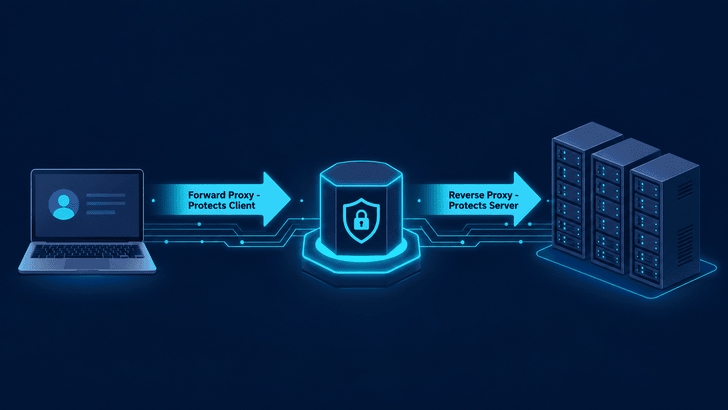
The simplest way to understand the difference is this: a forward proxy protects the client, while a reverse proxy protects the server.
Everything else flows from that single principle.
Forward Proxy: Your Representative to the Outside World
Imagine you're in a large corporate office. You don't walk directly up to every external website yourself—instead, there's a designated intermediary that handles all outbound communication on behalf of everyone in the building.
That's a forward proxy.
A forward proxy sits between internal clients and the public internet. When you make a request to example.com, your browser doesn't reach out directly. Instead, the request goes to the proxy server, which forwards it to the destination. The response follows the same path in reverse.
[Client] → [Forward Proxy] → [Internet] → [Destination Server]To the destination server, the request appears to come from the proxy, not from your machine. Your IP address stays hidden.
When Would You Use One?
Access Control — Organizations use forward proxies to enforce internet usage policies. Block social media during work hours? Whitelist only approved domains? The proxy handles this at the network level before requests ever leave the building.
Monitoring and Logging — Every request passes through the proxy, creating a natural audit trail. Security teams can track who accessed what and when—invaluable for compliance and incident response.
Content Caching — If hundreds of employees access the same documentation site or software repository, the proxy can cache responses locally. The first request fetches from the internet; subsequent requests serve from cache, reducing bandwidth and improving speed.
Anonymity and Geo-Shifting — By routing traffic through proxies in different regions, users can appear to be browsing from different locations. This is how VPN services and geo-unblocking tools work at a fundamental level.
Reverse Proxy: The Gatekeeper at the Server's Door
Now flip the scenario. Instead of a client wanting to hide from servers, imagine you run a popular web application with millions of users. You don't want those users knowing about—or directly accessing—every server in your infrastructure.
Enter the reverse proxy.
A reverse proxy sits in front of your backend servers. Every incoming request from the internet hits the reverse proxy first. It then decides which server should handle the request, forwards it internally, and returns the response to the client.
[Client] → [Internet] → [Reverse Proxy] → [Backend Server 1]
                                         → [Backend Server 2]
                                         → [Backend Server 3]
To the client, there's only one server. The complex infrastructure behind the proxy is completely invisible.
What Makes It Powerful?
- Load Balancing — A single server can only handle so much traffic. A reverse proxy distributes incoming requests across multiple backend servers using algorithms like round-robin, least connections, or IP hash. If one server goes down, the proxy reroutes traffic to healthy ones without the client ever noticing.
- SSL Termination — Handling TLS encryption and decryption is computationally expensive. Rather than burdening every application server with this work, the reverse proxy handles it at the edge. Internal traffic between the proxy and backend servers can travel unencrypted (or with lighter encryption), simplifying certificate management and improving performance.
- Routing and Microservices — Modern applications are often split into multiple services. A reverse proxy can inspect request paths and route accordingly:
/api/usersgoes to the user service,/api/ordersgoes to the order service,/staticserves from a CDN. The client sees one unified API. - Security Through Obscurity — Your backend servers never need public IP addresses. They sit in a private subnet, unreachable from the internet. The reverse proxy is the only exposed entry point, dramatically reducing the attack surface.
- Caching and Compression — Similar to forward proxies, reverse proxies can cache responses. A frequently-requested product page or article can be served directly from the proxy without hitting the application server at all. Response compression also reduces bandwidth usage for clients.
The Tools of the Trade
In practice, you'll encounter these technologies most often:
- NGINX — The most popular reverse proxy on the web. Lightweight, high-performance, and doubles as a web server.
- HAProxy — Purpose-built for high-availability load balancing with advanced health-checking capabilities.
- Apache HTTP Server — The veteran web server that also functions capably as a reverse proxy via
mod_proxy. - IIS ARR — Microsoft's Application Request Routing module for Windows environments.
- Traefik — A modern, cloud-native reverse proxy designed for containerized environments and dynamic configuration.
Why This Knowledge Matters for Developers
It's tempting to treat proxy layers as "infrastructure concerns" that live outside our code. But understanding how requests actually flow through your architecture is invaluable.
Ever debugged a CORS error that turned out to be a misconfigured reverse proxy? Or tracked down a performance bottleneck that was actually caused by proxy-level caching decisions? Or spent hours troubleshooting why X-Forwarded-For headers weren't being set correctly?
Every layer between the client and your application code plays a role. Forward proxies shape how outgoing requests leave your network. Reverse proxies determine how incoming requests reach your application. Gateways, load balancers, and CDNs add additional layers of routing logic.
Knowing the journey a request takes—from the client through proxies, firewalls, and routers before finally hitting your application server—transforms how you think about security, performance, and debugging.
Wrapping Up
Aspect						Forward Proxy						Reverse Proxy
Protects					Client								Server
Sits in front of			Internet							Backend servers
Client knows about it?		Yes (configured explicitly)			No (invisible to client)
Server knows about it?		No									Yes
Common use case				Access control, anonymity			Load balancing, SSL, security
Who configures it?			Client-side admin					Server-side admin
Neither is inherently better—they solve different problems, and large-scale architectures often employ both simultaneously. A corporate network might use a forward proxy for outbound employee traffic while hosting applications behind a reverse proxy for inbound customer traffic.
Understanding both gives you a clearer picture of how data moves through the modern internet—and makes you a more effective developer when things inevitably go wrong.