
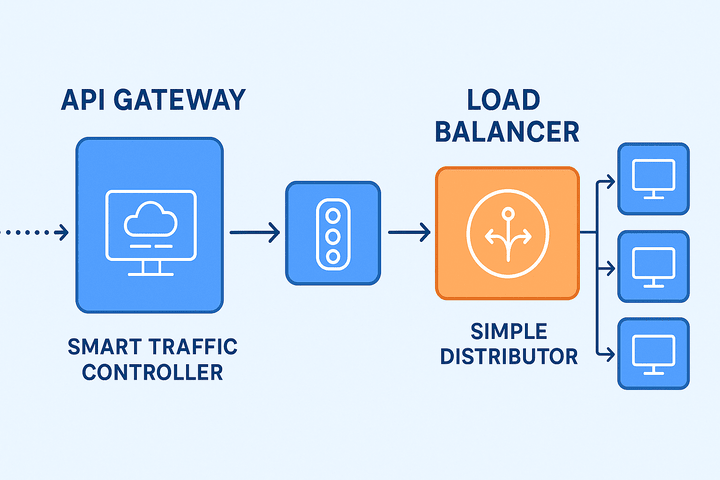
In the world of distributed systems and cloud-native applications, terms like API Gateway and Load Balancer are thrown around constantly. While they both act as "traffic cops" for your network, they perform fundamentally different jobs. Confusing them is easy, but understanding their distinct roles is key to designing robust, scalable, and secure systems.
So, let's demystify these two critical components. We'll move beyond the textbook definitions and see how they work in practice.
The Core Concept: A Tale of Two Responsibilities
Imagine a large, modern corporation.
- The Load Balancer is like the Receptionist at the front desk. Their primary job is to look at incoming visitors (requests) and direct them to an available, appropriate department (server). They don't care what the visitor's complex business is; they just need to distribute the crowd efficiently to prevent any single department from being overwhelmed.
- The API Gateway is like the Executive Assistant to the CEO. This role is much more involved. They don't just route requests; they manage them. They check your appointment (authentication), ensure you're not coming by too often (rate limiting), translate your query if needed (protocol translation), and might even compile a single report from three different departments (response aggregation) before presenting it to you.
- In short:
- Load Balancer: Focuses on where the request goes.
- API Gateway: Focuses on how the request is handled.
What is a Load Balancer? The Distributor of Traffic
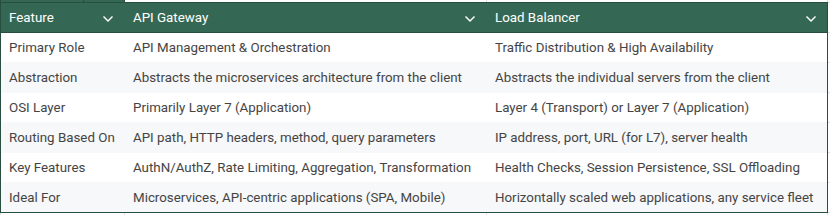
A Load Balancer (LB) is a device or service that distributes incoming network traffic across multiple backend servers. Its primary goal is to ensure no single server bears too much load, thereby improving the application's responsiveness, throughput, and availability.
Key Characteristics:
- Primary Goal: Distribute load, maximize throughput, minimize response time, ensure high availability.
- OSI Layers: Operates at Layer 4 (Transport Layer - TCP/UDP) or Layer 7 (Application Layer - HTTP/HTTPS).
- L4 LB: Makes decisions based on IP addresses and ports. It's fast and simple. (e.g., distributing database connections).
- L7 LB: Makes decisions based on the content of the message (URL, headers, cookies). This allows for smarter routing.
- Core Features:
- Health Checks: Periodically pings servers to ensure they are healthy and removes faulty ones from the pool.
- Session Persistence (Sticky Sessions): Ensures requests from the same client are sent to the same backend server.
- Various Algorithms: Round-robin, least connections, IP hash, etc.
Example: E-Commerce Website
Imagine an e-commerce site, shop.example.com, running on three identical web servers.
- A user visits
shop.example.com. The DNS points them to the Load Balancer's IP address. - The Load Balancer receives the request.
- Using its algorithm (e.g., round-robin), it forwards the request to Web Server A.
- The user browses products. Their next request hits the Load Balancer again.
- This time, the LB forwards it to Web Server B, effectively distributing the load.
- If Web Server C crashes, the Load Balancer's health checks detect it and stop sending traffic to it, ensuring the site remains up.
The Load Balancer here is not concerned with whether the request is for the /products page or the /checkout page. Its job is purely to distribute requests across the available, healthy servers.
What is an API Gateway? The Manager of APIs
An API Gateway is an API management tool that sits between a client and a collection of backend microservices. It acts as a single, unified entry point for all clients, abstracting the underlying microservices architecture.
Key Characteristics:
- Primary Goal: Simplify client interactions, manage API traffic, and provide cross-cutting concerns.
- OSI Layer: Operates primarily at Layer 7 (Application Layer - HTTP/HTTPS, gRPC, WebSockets).
- Core Features:
- Request Routing: Routes
/ordersrequests to the Order Service and/usersrequests to the User Service. - API Composition / Aggregation: Combines data from multiple services into a single response for the client.
- Authentication & Authorization: Validates API keys, JWT tokens, etc., before the request even reaches a microservice.
- Rate Limiting & Throttling: Protects backend services from being overwhelmed by too many requests from a single client.
- Caching: Stores responses for frequent requests to reduce load on backend services.
- Logging, Monitoring, and Metrics: Provides a central point to collect API usage data.
- Circuit Breaker: Stops sending requests to a failing service, allowing it to recover.
- Protocol Translation: Can allow a REST API client to communicate with a gRPC backend service.
- Request Routing: Routes
Example: Mobile App for a Food Delivery Service
A food delivery mobile app has a home screen that needs data from multiple microservices: Restaurant-Service, User-Service, Promo-Service, and Order-Service.
Without an API Gateway:
The mobile app would have to make four separate API calls to four different endpoints. This is inefficient, puts a burden on the client, and is hard to manage.
With an API Gateway:
- The mobile app makes a single API call to the API Gateway:
GET /api/home_screen. - The API Gateway receives this request.
- It performs authentication using the app's token.
- It then fans out this single request to the four backend services concurrently.
- It aggregates the results from all services into a single, structured JSON response.
- It sends the unified response back to the mobile app.
Additionally, the API Gateway can:
- Rate Limit: Prevent a single user from spamming the
/api/home_screenendpoint. - Cache: Cache the home screen data for 30 seconds to improve performance for other users.
- Validate: Check the structure of the request.
The API Gateway here is deeply concerned with the meaning of the request and manages the entire lifecycle of the API call.
Side-by-Side Comparison Table
How They Work Together: A Collaborative Architecture
It's not an "either/or" choice. In a sophisticated microservices architecture, they often work in tandem. Let's look at our food delivery service again.
- The client (mobile app) talks first to the API Gateway.
- The API Gateway handles authentication, rate limiting, and routes a request to the
Order-Service. - But the
Order-Serviceitself is not a single server; it's a cluster of 5 instances for resilience. - So, the API Gateway's request to the
Order-Serviceis actually sent to an Internal Load Balancer. - This Internal Load Balancer then distributes the request to one of the 5 healthy
Order-Serviceinstances.
In this flow:
- The API Gateway is the "smart router" that understands the business logic of the APIs.
- The Load Balancer is the "workhorse" that ensures the
Order-Servicecluster itself is scalable and highly available.
Conclusion: Choosing the Right Tool
- Use a Load Balancer when your main concern is scalability and high availability for a group of identical servers (e.g., a pool of web servers, database read replicas). It's your foundational tool for making any service resilient.
- Use an API Gateway when you have a microservices architecture and need a centralized point for API management, security, and composition. It's essential for providing a clean, consistent, and secure API to your clients while hiding the complexity of your backend.
Ultimately, the Load Balancer is a fundamental building block for scalability, while the API Gateway is an enabler for modern, decoupled microservices architectures. By understanding their distinct strengths, you can architect systems that are not only performant and resilient but also manageable and secure.
What are your experiences with API Gateways and Load Balancers? Have you found one to be more critical than the other in your projects? Share your thoughts in the comments below!