
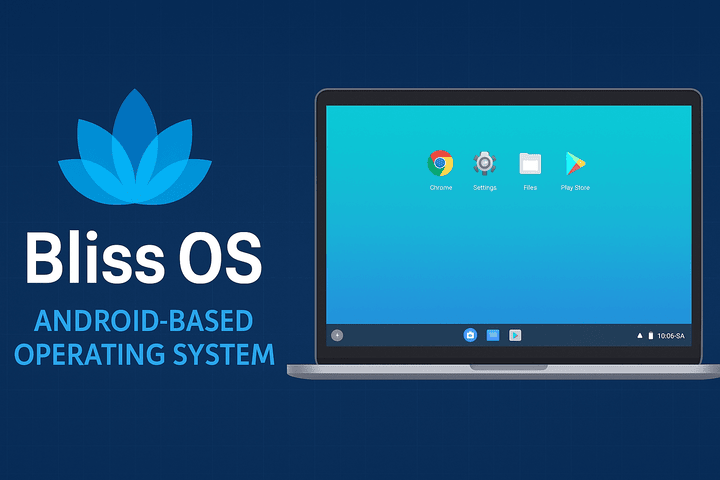
The idea of running Android on a desktop or laptop has fascinated tech enthusiasts for years. While emulators like BlueStacks and Nox provide a way to experience Android apps on PCs, they often come with heavy system resource usage and limitations. Enter Bliss OS — an open-source operating system that brings the full power of Android to desktops, laptops, and tablets, offering both mobility and productivity in a single platform.
🔹 What is Bliss OS?
Bliss OS is an Android-based operating system built on top of the Android-x86 project. Instead of being an emulator, it runs natively on PC hardware, which means smoother performance, better multitasking, and access to the vast Android ecosystem.
It is designed to adapt to different devices, offering multiple interface modes (tablet, desktop, or phone), making it flexible for gamers, developers, and productivity users alike.
🔹 Key Features of Bliss OS
1. Android at Its Core
Bliss OS runs the latest Android versions (such as Android 12L and Android 13 in newer builds), giving you access to millions of apps from the Google Play Store or direct APK installations.
2. Desktop-Like Experience
Unlike mobile-first Android, Bliss OS introduces a desktop mode that resembles Windows or Linux. You get a taskbar, start menu, resizable windows, and full multitasking features.
3. Performance and Gaming
- Optimized for high-performance gaming
- Supports Vulkan and OpenGL for better graphics rendering
- Works smoothly with games like PUBG Mobile, Free Fire, Genshin Impact, and Call of Duty Mobile
- Includes keymapping support for keyboard and mouse gameplay
4. Customization and Blissify
Bliss OS includes Blissify, a customization tool that allows users to tweak themes, UI layouts, navigation styles, and animations — ensuring a truly personalized Android desktop.
5. Security and Privacy
The OS comes with enhanced privacy controls, including app permission management and options to disable unnecessary trackers. This makes it a good alternative for users concerned about security.
6. Broad Hardware Support
- Works on both Intel and AMD PCs
- Compatible with UEFI and Legacy BIOS
- Runs on 64-bit architecture (modern builds)
- Can be installed on desktops, laptops, and some Chromebooks
🔹 Installation Options
Bliss OS can be installed in different ways depending on your needs:
- Live Boot via USB → Test the OS without installing.
- Dual Boot with Windows/Linux → Run Bliss OS alongside your current OS.
- Standalone Installation → Replace your OS entirely with Bliss OS.
- Virtual Machine Setup → Run Bliss OS inside VirtualBox or VMware.
This flexibility makes it ideal for testing or permanent use.
🔹 Who Should Use Bliss OS?
- 🎮 Gamers → Play Android games with better graphics and controls.
- 👩💻 Developers → Test Android apps in a real desktop environment.
- 🖥 PC Enthusiasts → Revive old computers with a lightweight OS.
- 📈 Productivity Users → Run apps like Zoom, Slack, Office, and Gmail in a desktop-style environment.
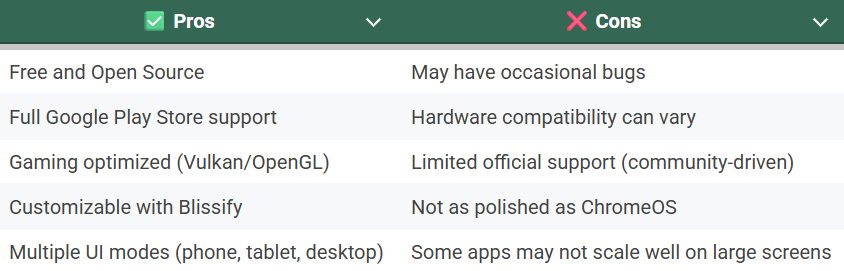
🔹 Pros and Cons of Bliss OS
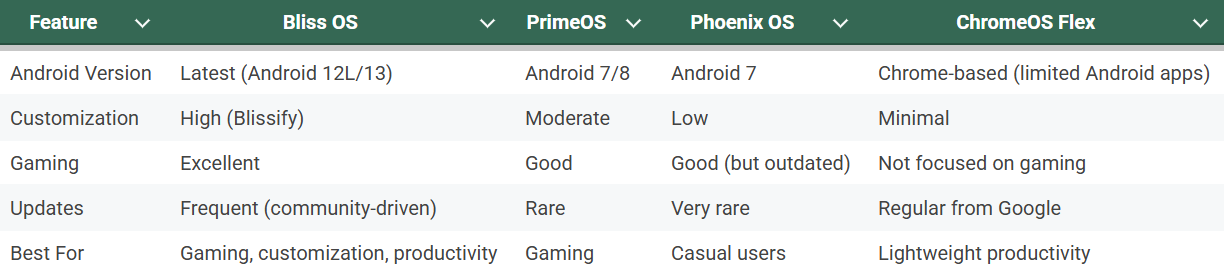
🔹 Bliss OS vs Alternatives
🔹 Final Thoughts
Bliss OS is a unique project that blends the flexibility of Android with the power of desktop computing. It’s not just for gamers — it’s also for anyone who wants to breathe new life into older hardware, test Android apps natively, or enjoy a customizable hybrid OS.
While it may not be as polished as ChromeOS Flex, its open-source nature, regular updates, and deep customization options make it one of the most exciting Android-based desktop operating systems available today.
If you’ve ever wished your PC could run like an Android phone — but with desktop-level multitasking — Bliss OS is worth a try.