
Introduction
In Week 1, we learned what Java is, how it works, and how to write our first “Hello World” program.
Now it’s time to start real Java programming.
In this article, we’ll explore:
- Java program structure & syntax
- Variables in Java
- Data types (Primitive & Non-Primitive)
- Type casting
- Java naming conventions
These are fundamental concepts you must master before moving into logic and problem-solving.
Java Program Structure (Quick Recap)
A basic Java program looks like this:
public class Example {

    public static void main(String[] args) {
        // Code goes here
    }

}
Important Rules
- Every Java program has at least one class
- Execution starts from the
main()method - Java is case-sensitive
- Every statement ends with
;
What Is a Variable?
A variable is a container used to store data in memory.
Example:
int age = 25;
Here:
int→ data typeage→ variable name25→ value
Java Variable Syntax
dataType variableName = value;
Example:
String name = "Mahabub";
double salary = 55000.75;
boolean isActive = true;
Java Data Types Overview
Java data types are divided into two main categories:
1️⃣ Primitive Data Types
2️⃣ Non-Primitive (Reference) Data Types
Primitive Data Types in Java
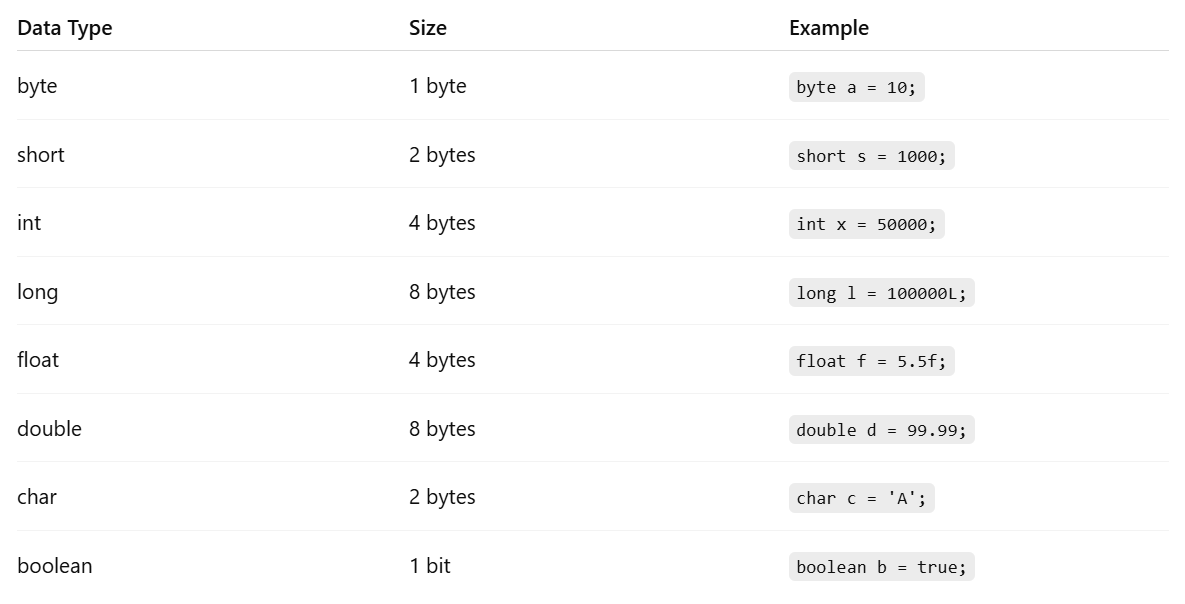
Primitive data types store simple values and are predefined by Java.
Most Commonly Used Types
In real projects, you’ll mostly use:
int
double
boolean
char
Example:
int score = 90;
double price = 199.99;
boolean isLoggedIn = false;
char grade = 'A';
Non-Primitive Data Types
Non-primitive data types store references to objects.
Examples:
- String
- Array
- Class
- Interface
String Example:
String message = "Welcome to Java";
👉 Strings are objects, not primitive types.
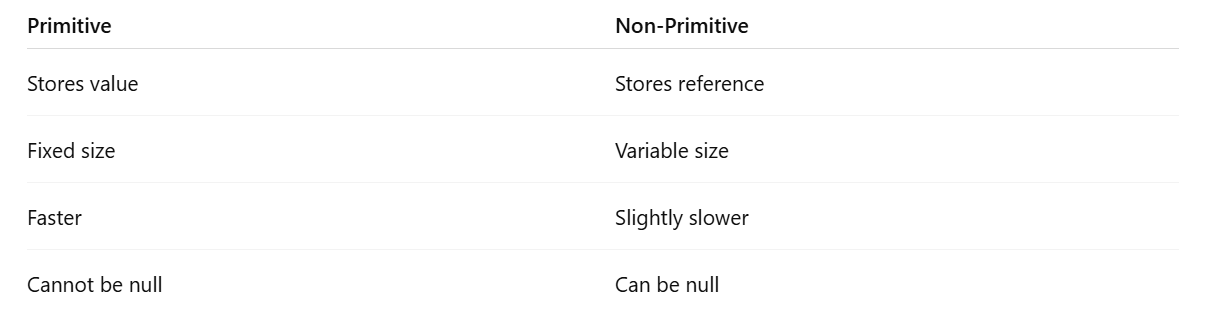
Difference: Primitive vs Non-Primitive
Type Casting in Java
Type casting means converting one data type into another.
1️⃣ Widening Casting (Automatic)
int num = 10;
double result = num;
✔ Safe
✔ No data loss
2️⃣ Narrowing Casting (Manual)
double value = 9.8;
int number = (int) value;
⚠ Possible data loss
⚠ Requires manual cast
Java Naming Conventions (Very Important)
Following conventions makes your code professional and readable.
Variables & Methods
int studentAge;
double totalPrice;
✔ camelCase
Class Names
class StudentProfile
✔ PascalCase
Constants
final int MAX_LIMIT = 100;
✔ UPPER_CASE
Common Beginner Mistakes
❌ Forgetting semicolon
❌ Using wrong data type
❌ Class name mismatch
❌ Not initializing variables
❌ Confusing String with string
Real-World Example Program
public class Student {

    public static void main(String[] args) {
        String name = "Rahim";
        int age = 20;
        double cgpa = 3.75;
        boolean isActive = true;

        System.out.println(name);
        System.out.println(age);
        System.out.println(cgpa);
        System.out.println(isActive);
    }

}
Summary
In this article, you learned:
- Java syntax basics
- How variables work
- Primitive & non-primitive data types
- Type casting
- Java naming conventions
These concepts are used in every Java program, from beginner to enterprise-level applications.